# SpringBoot 整合 Knife4j
# 1 什么是 Knife4j
在日常开发中,写接口文档使我们必不可少的,而 Knife4j 就是一个接口文档工具。可以看作是 Swagger 的升级版,但是界面比 Swagger 更好看,功能更丰富。
早期,swagger-boostrap-ui 是 1.x 版本,如今 swagger-bootrap-ui 到 2.x,同时也更改名字 Knife4j,适用于单体和微服务项目。
Knife4j 官方网站:https://doc.xiaominfo.com/
# 2 SpringBoot 整合 Knife4j
创建 SpringBoot 项目
引入 Knife4j 相关依赖
<dependency><groupId>com.github.xiaoymin</groupId>
<artifactId>knife4j-spring-boot-starter</artifactId>
</dependency>配置 Knife4j 配置类
import org.springframework.context.annotation.Bean;
import org.springframework.context.annotation.Configuration;
import springfox.documentation.builders.ApiInfoBuilder;
import springfox.documentation.builders.ParameterBuilder;
import springfox.documentation.builders.PathSelectors;
import springfox.documentation.builders.RequestHandlerSelectors;
import springfox.documentation.schema.ModelRef;
import springfox.documentation.service.ApiInfo;
import springfox.documentation.service.Contact;
import springfox.documentation.service.Parameter;
import springfox.documentation.spi.DocumentationType;
import springfox.documentation.spring.web.plugins.Docket;
import springfox.documentation.swagger2.annotations.EnableSwagger2WebMvc;
import java.util.ArrayList;
import java.util.List;
//swagger2 配置类@Configuration@EnableSwagger2WebMvcpublic class Knife4jConfig {
@Beanpublic Docket adminApiConfig(){
List<Parameter> pars = new ArrayList<>();
ParameterBuilder tokenPar = new ParameterBuilder();
tokenPar.name("token")
.description("用户token")
.defaultValue("")
.modelRef(new ModelRef("string"))
.parameterType("header")
.required(false)
.build();
pars.add(tokenPar.build());
// 添加 head 参数 endDocket adminApi = new Docket(DocumentationType.SWAGGER_2)
.groupName("adminApi")
.apiInfo(adminApiInfo())
.select()
// 只显示 admin 路径下的页面.apis(RequestHandlerSelectors.basePackage("com.dkx"))
.paths(PathSelectors.regex("/admin/.*"))
.build()
.globalOperationParameters(pars);
return adminApi;
}private ApiInfo adminApiInfo(){
return new ApiInfoBuilder()
.title("后台管理系统-API文档")
.description("本文档描述了后台管理系统微服务接口定义")
.version("1.0")
.contact(new Contact("dkx", "http://dkx.com", "1851644015@qq.com"))
.build();
}}在 controller 类中配置注解让 Knife4j 有中文信息
- 类:Api (tags = “”)
- 方法:ApiOperation (value =“”)
@Api(tags = "角色管理接口")
@Controller@RequestMapping("/admin/system/sysRole")
public class SysRoleController {
@Qualifier(value = "SysRoleServiceImpl")
@Autowiredprivate SysRoleService sysRoleService;
@ApiOperation(value = "查询所有的接口")
@RequestMapping(value = "/findAll", method = RequestMethod.GET)
@ResponseBodypublic List<SysRole> findAllRole() {
List<SysRole> list = sysRoleService.list();
return list;
}@ApiOperation(value = "逻辑删除接口")
@RequestMapping(value = "/remove", method = RequestMethod.DELETE)
@ResponseBodypublic boolean removeRole(Integer id) {
boolean b = sysRoleService.removeById(id);
return b;
}}测试
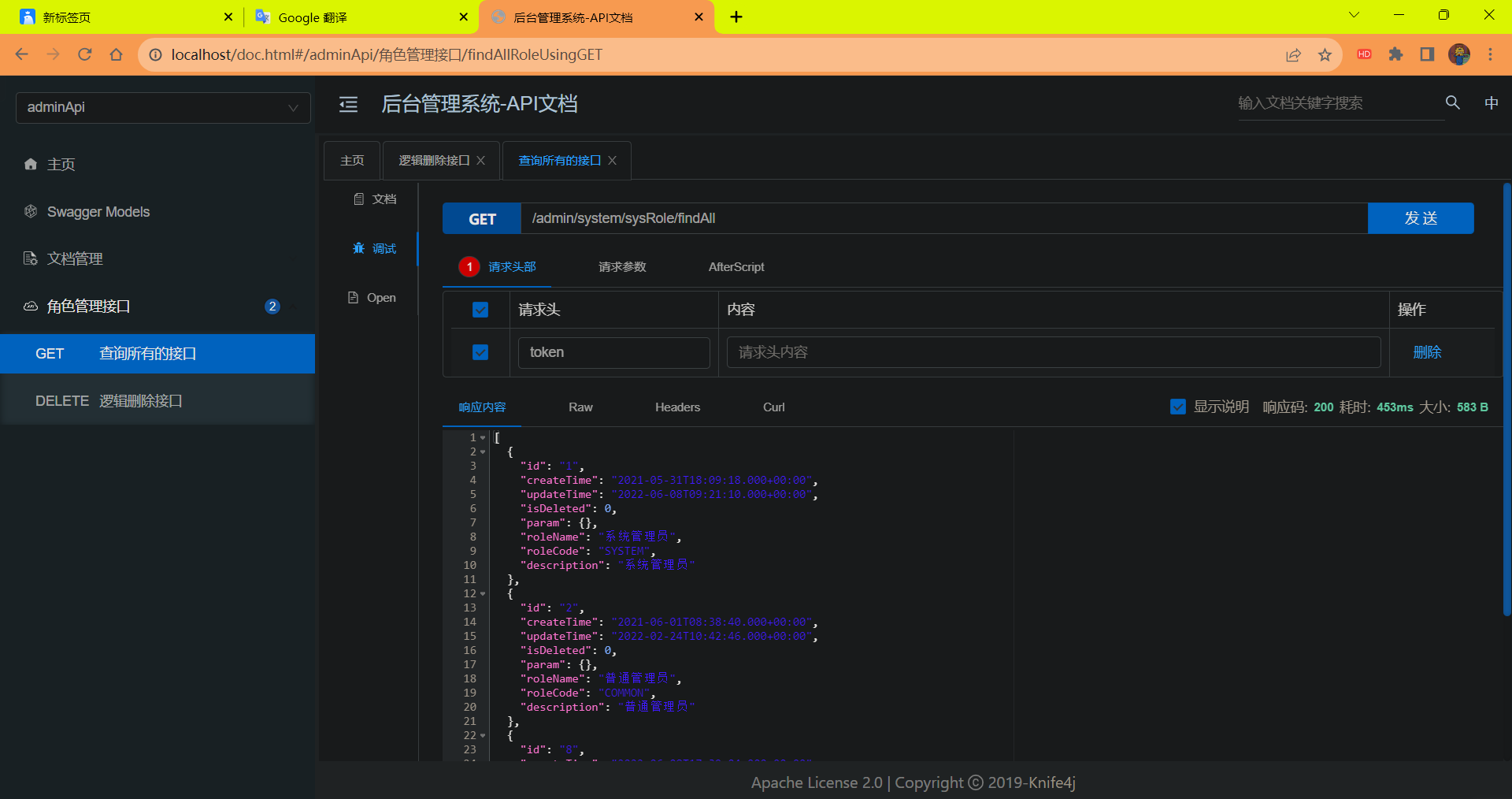
- 启动项目
- 访问路径:localhost/doc.html
测试接口的结果
![image-20230904141115698]()